It has been quite a while since our last build log, and while I wish I could sincerely say sorry for that, I will instead say: you’re welcome. Build logs and the blog in general took a lot of a backseat while we dealt with just crazy demand which ramped up in October & November of 2019. So instead of putting these posts up, I was helping the rest of the team to ensure people like you got your questions answered, and got your PCs delivered. Demand didn’t really stop until this month – so here we are again. I can’t promise that we will keep up the posting, but I can promise that we’ll post as often as we can.
Let’s kick things off with a banger.
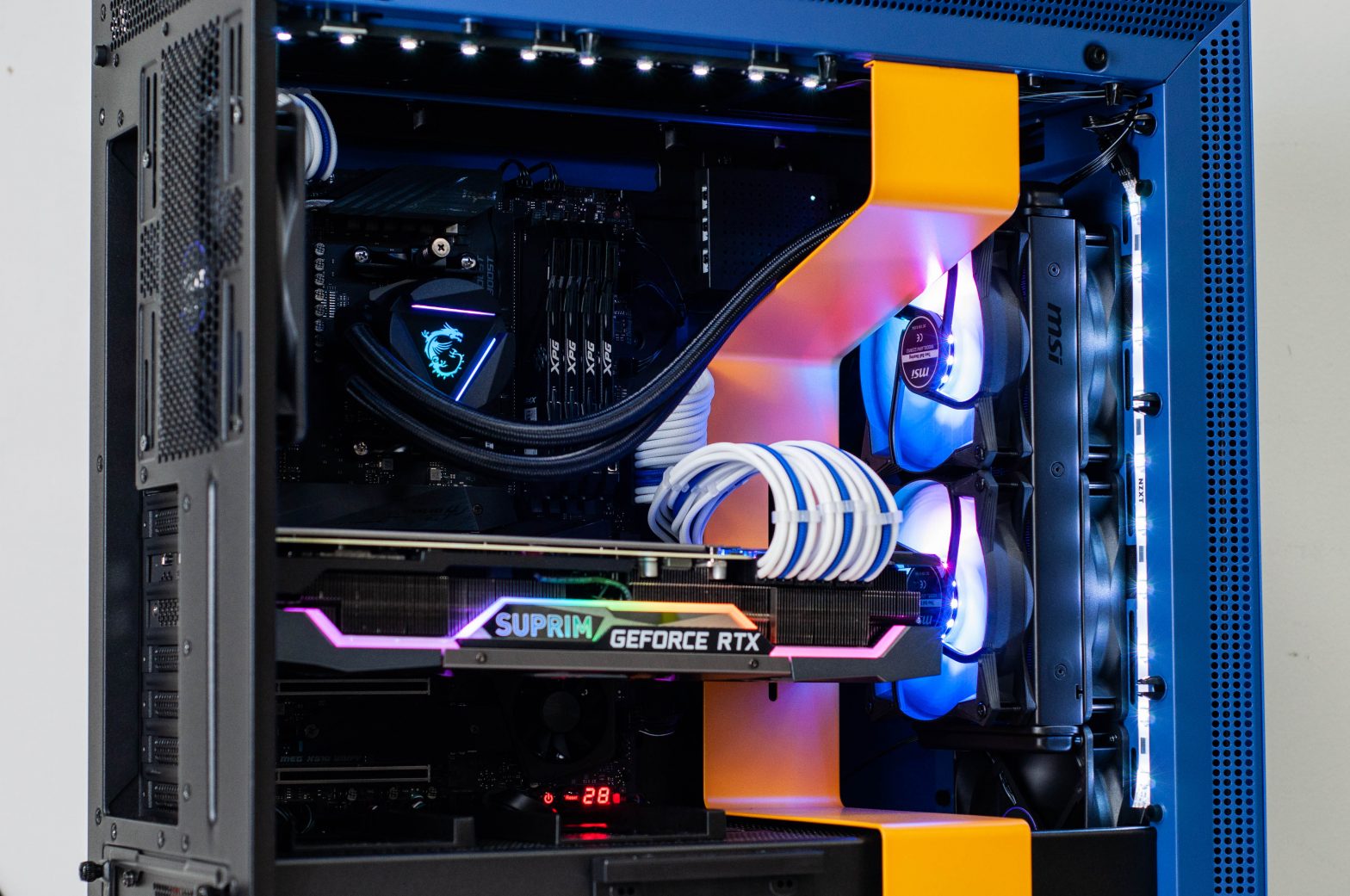
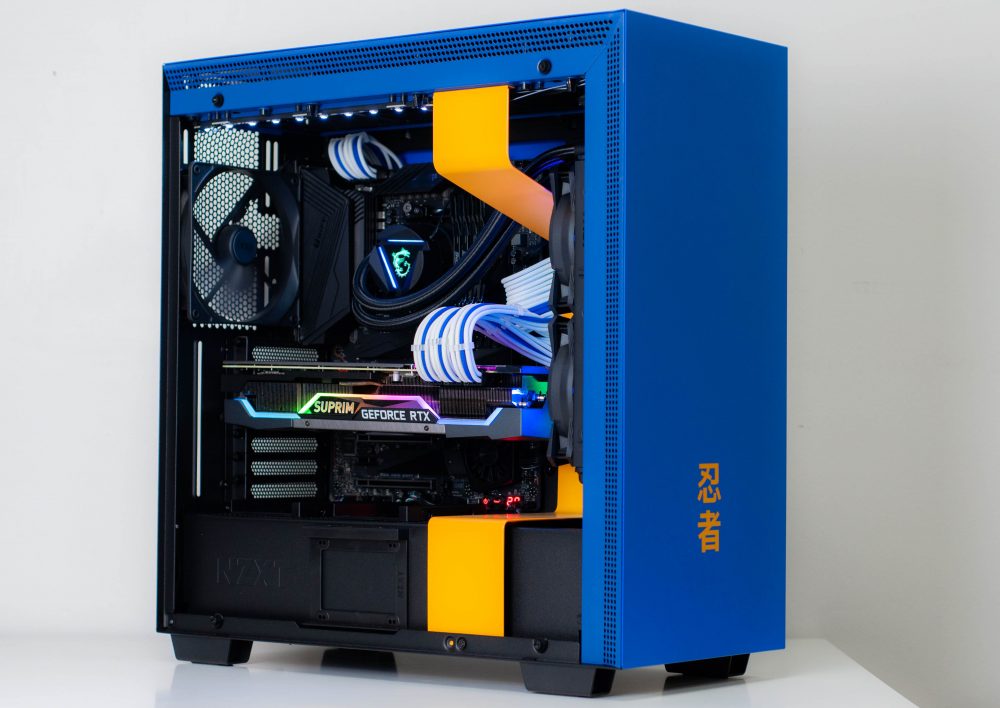
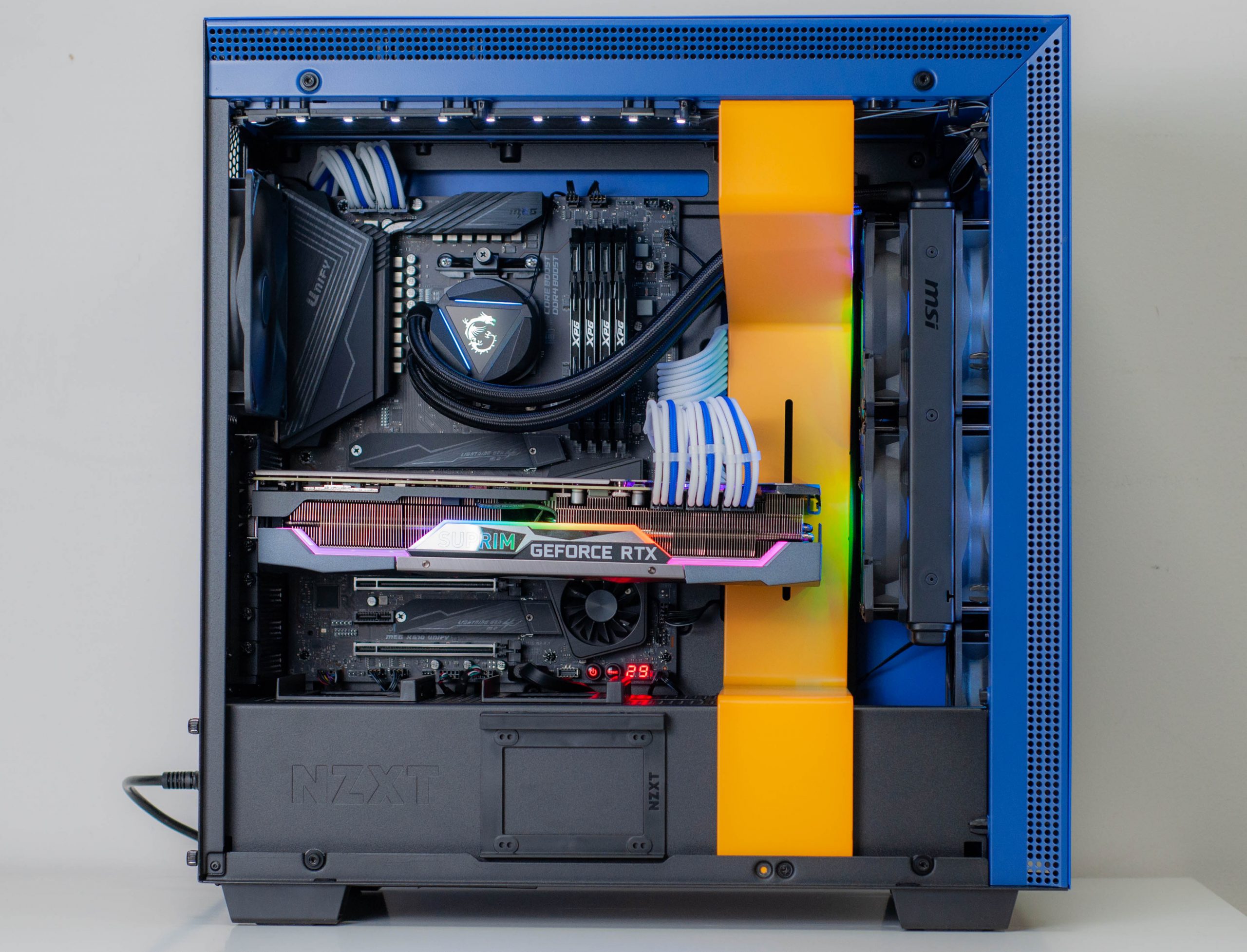
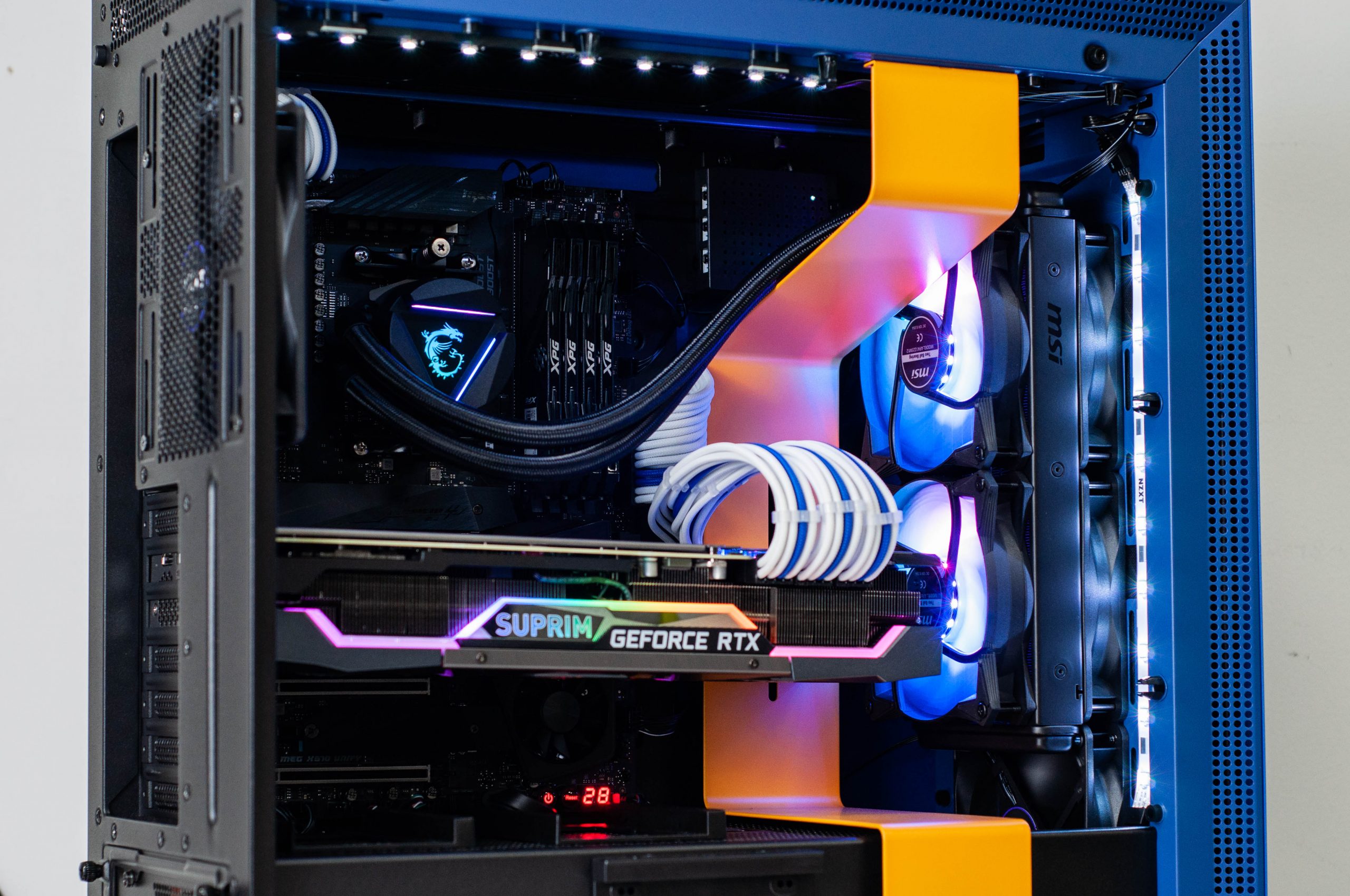
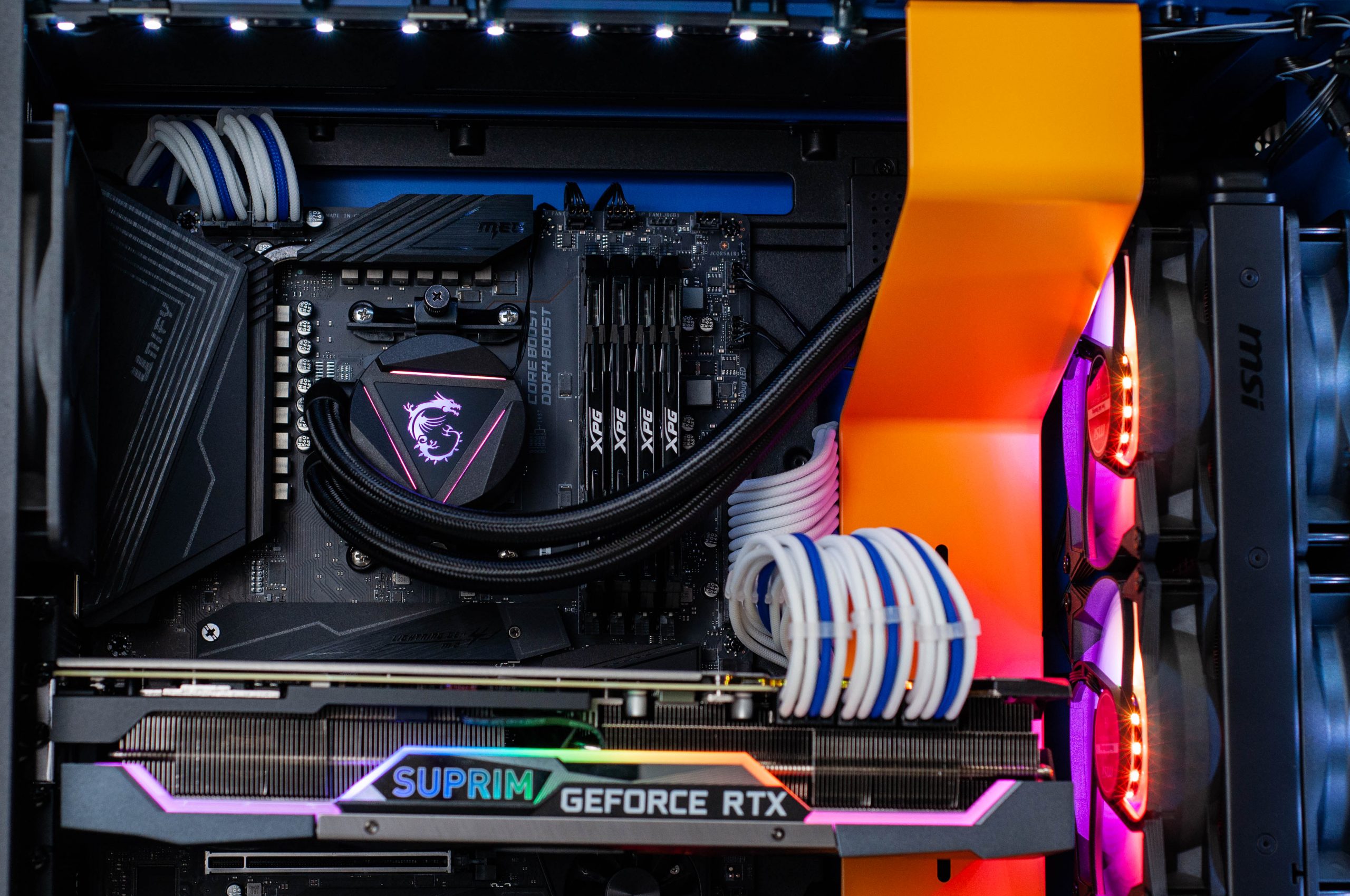
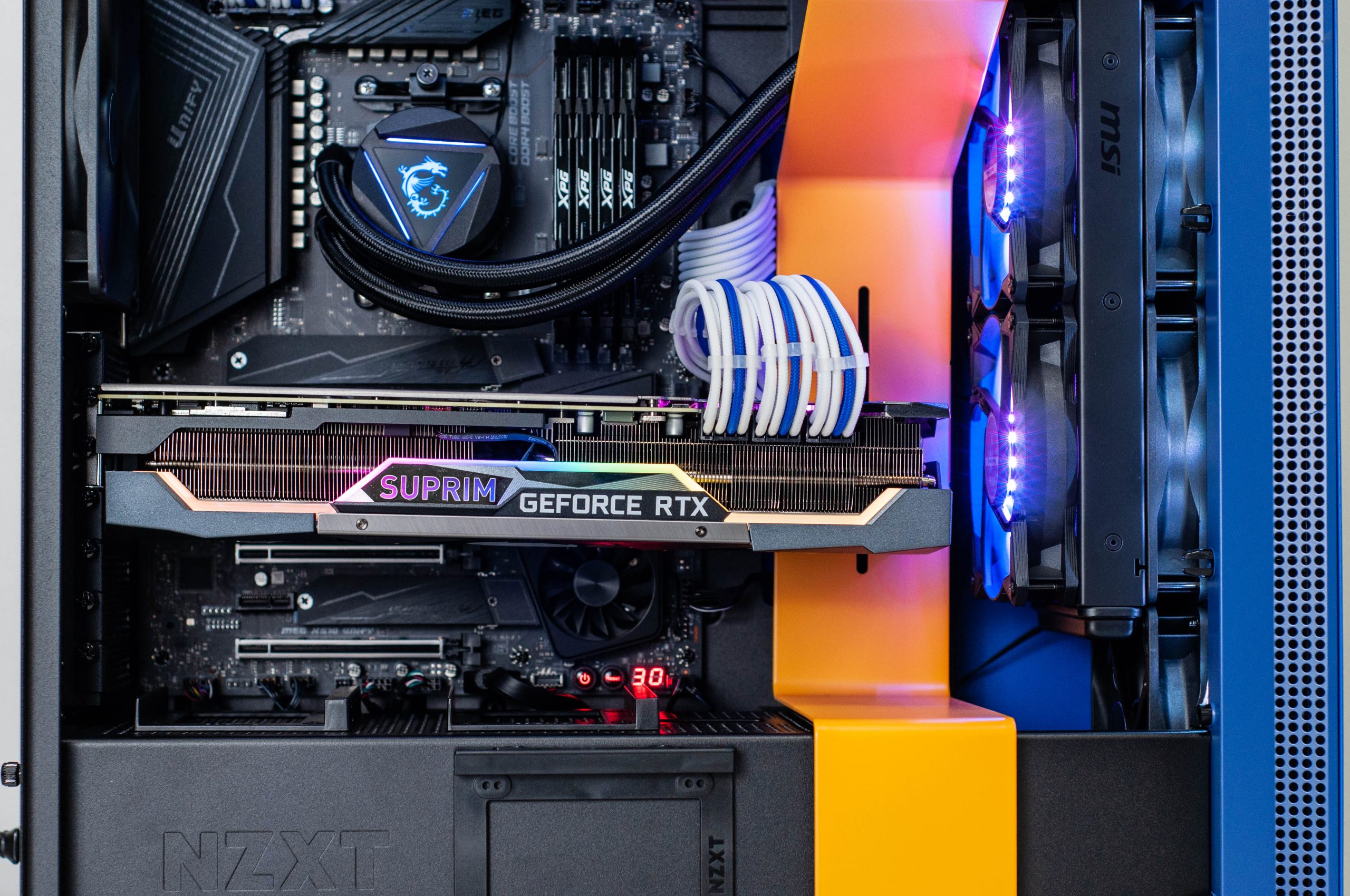
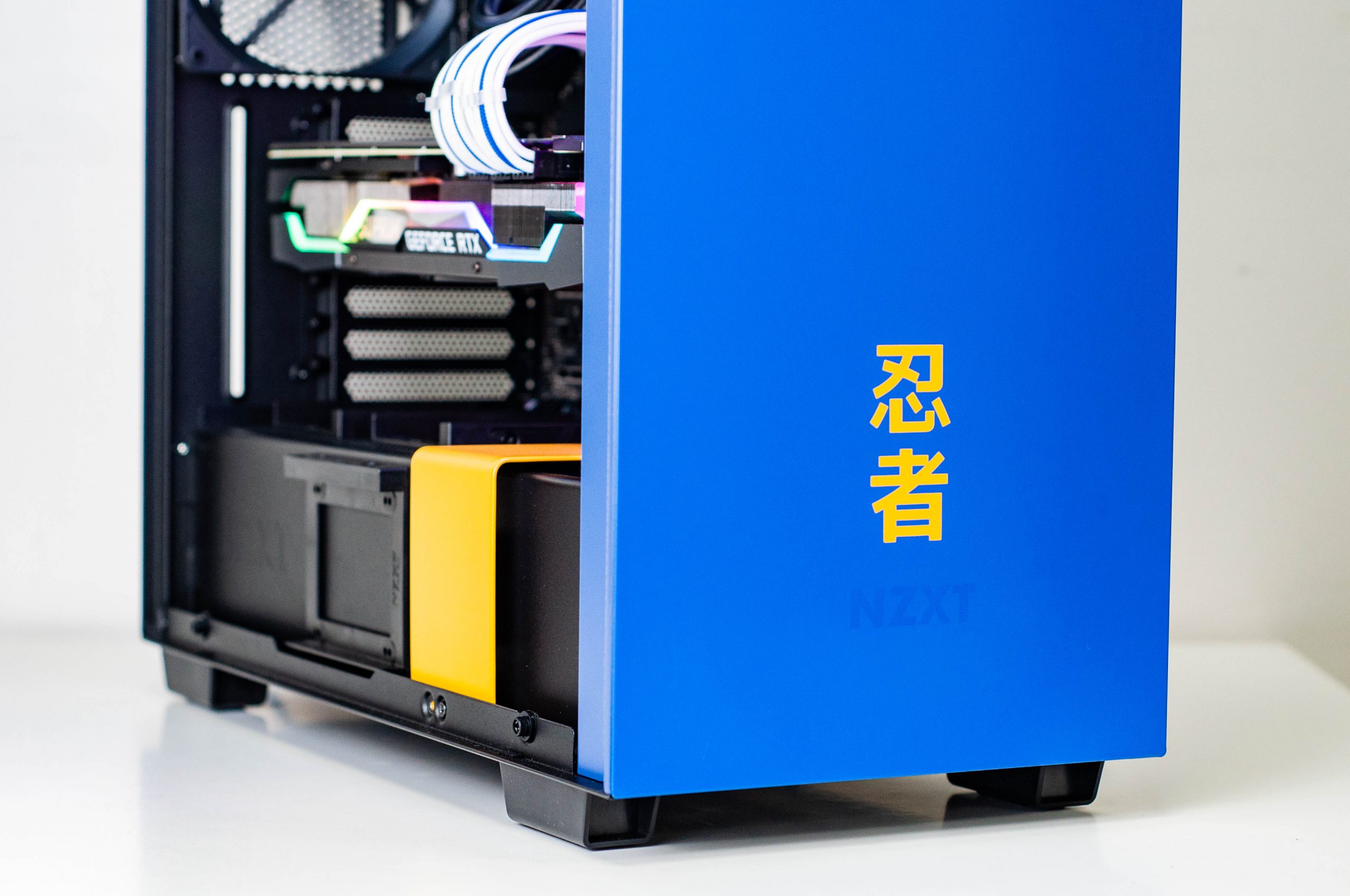
This customer found their next PC’s home inside the special edition NZXT H700i Ninja case. And what a PC it is.
This PC is decked out with AMD’s highest end 5000 series CPU, the 5950X which is a 16 core 32 thread CPU. Even if you wanted a better CPU today, it’s practically not possible. Even the 5950X is barely possible with all of the stock shortages, but as of the time of writing we have a few on offer within our custom PCs, so get in quick! If you do miss out, we also have the 12 core 24 thread 5900X currently available in PCs. What a time to be alive!
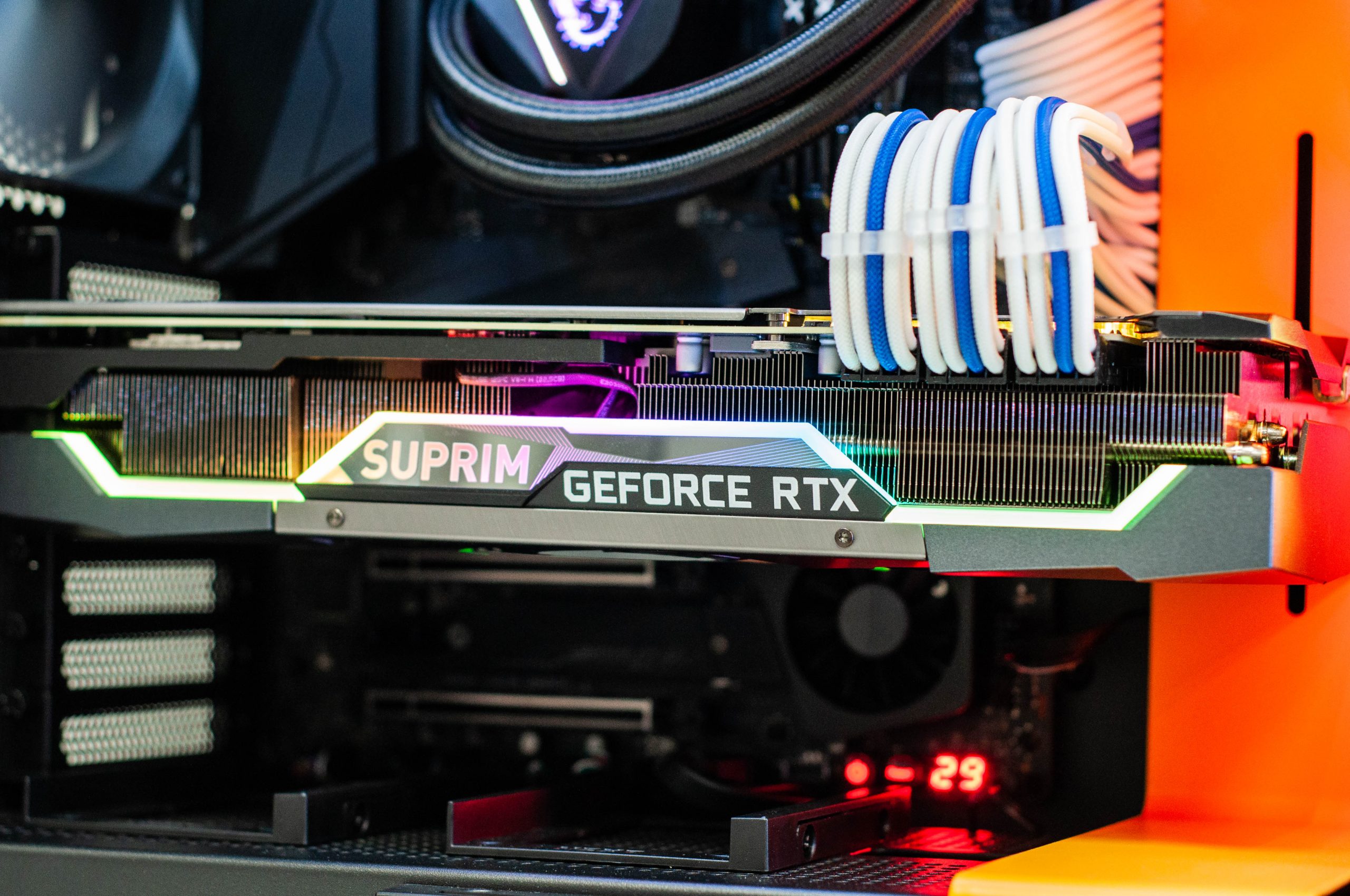
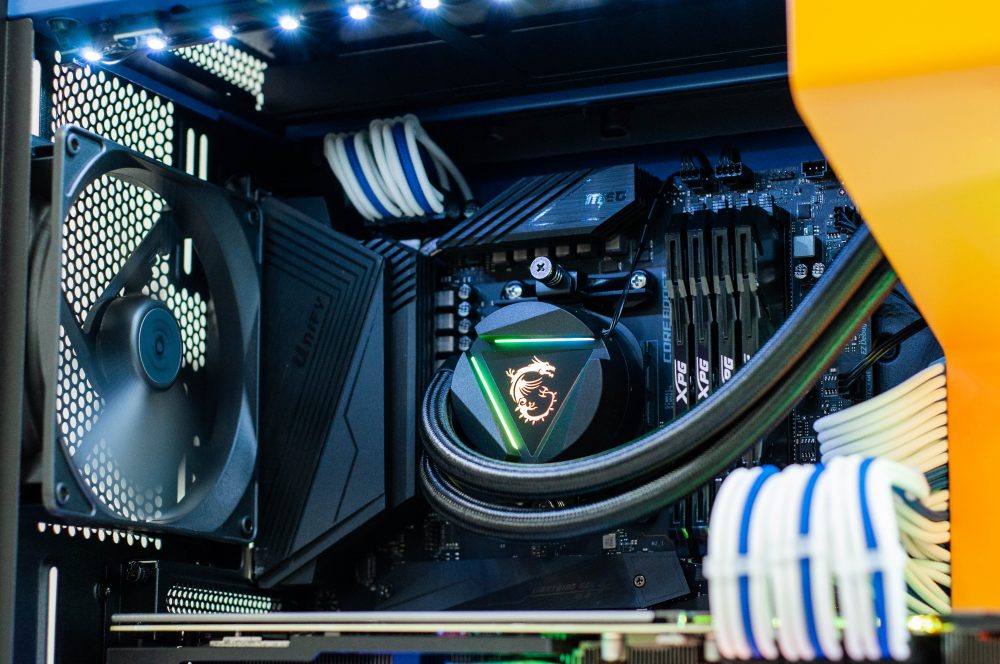
Also in this build, an AIO 240mm liquid cooler for the CPU, an adequate 32GB of OC (high speed) RAM, a 2TB NVMe M.2 Gen4 SSD, and of course the MSI RTX 3080 Suprim X.
The limited edition Ninja case looks just as good today as the first time we built in it, and we still have some left!
Customise your very own gaming PC on our website and your build could be featured here one day!
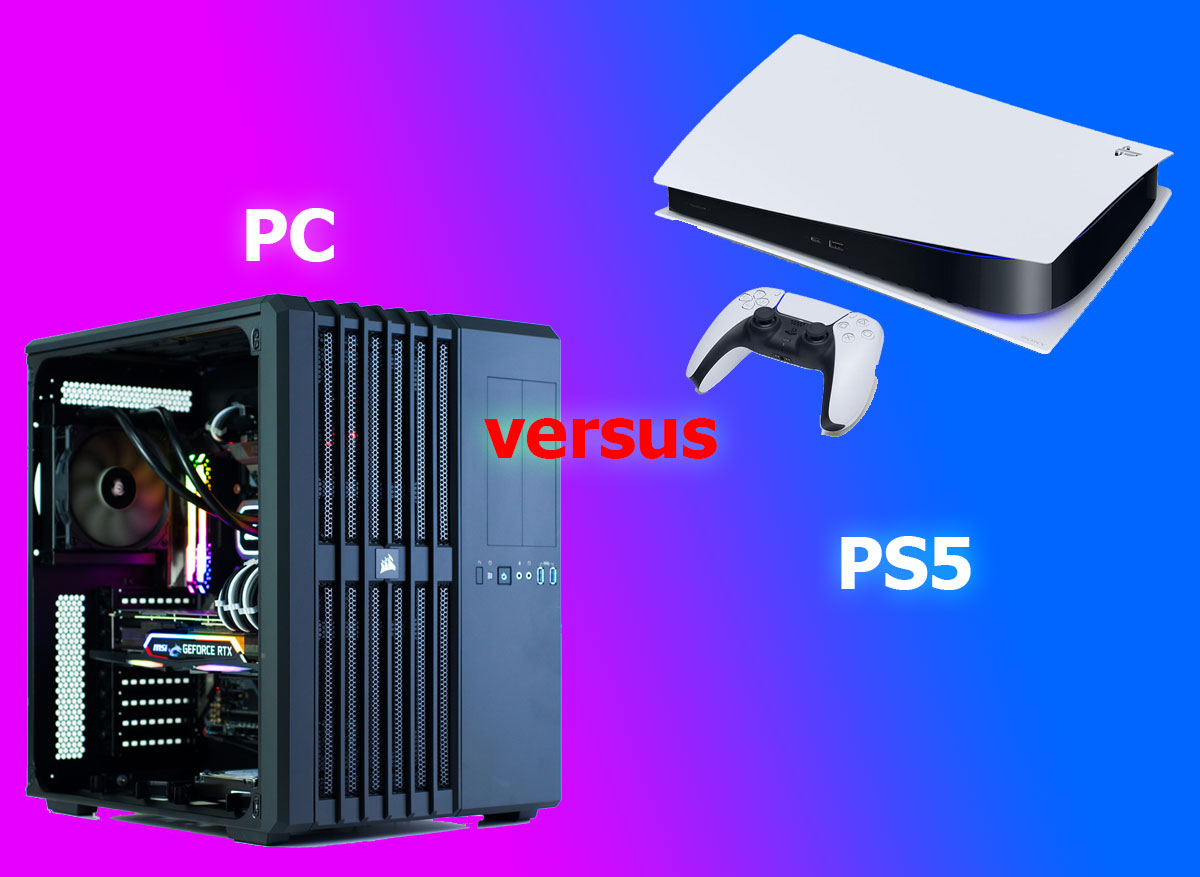
The much anticipated PlayStation 5 released late last year, and promised a lot of great upgrades and advantages over the previous generation PlayStation 4; but just how many of the promises are being adequately met, and how does this compare to PCs?
The PS5’s main feature set seems to be the following:
Ray tracing
4K gaming
Up to 120 Frames Per Second (FPS)
HDR technology
8K support
Ray tracing is something the gaming community should have been introduced to at around the time of Nvidia’s RTX 20 series GPU launch, which was approximately August 2018. I did a fairly in-depth write up on what ray tracing and Nvidia’s RTX cards were all about, if you want to check that out here. Right now, turning ray tracing on for your PS5 will mean a serious frame rate drop, so it’s only advised for single player games instead of online/competitive games – this is similar to PC, but unlike on PC there’s basically no wiggle room, whereas on PC if you have decent hardware you may be able to keep ray tracing on if you wish, and still play competitively (game dependant perhaps). Ray tracing is also supported by very few games right now, both on consoles and PC for what it’s worth.
4K gaming is great for those who may already have 4K capable TVs, or if you’re in the market for a new TV, a 4K TV is practically your only option. So it’s not entirely ground-breaking or unexpected that the PS5 would support this out of the box. 4K resolution is also available in gaming and home/office grade monitors. Many of the staff (myself included) have been using 4K displays with a PC for some time now.
120 FPS gaming (or higher) is something that has been happening for many years on the PC side of things. Generally speaking, most of your everyday monitors are 60Hz (meaning a maximum of 60 FPS), but opting instead for a ‘gaming’ monitor can mean a 144Hz, 165Hz, 240Hz, or even 360Hz monitor, with the FPS to match each of those. Not surprisingly, many staff (myself included again) do have high refresh rate gaming monitors/TVs in our lives, hooked up to our PCs. 120FPS is limited to very few games on PS5 at the time of writing. We expect this to become more of the norm as time goes on, but on the PC side of things it’s very rare to see a PC locked to 60FPS still.
HDR (High-Dynamic-Range) again should be familiar to those with relatively new TVs, or those in the market for a TV. There are differing qualities of the implementation of HDR and its effectiveness on screen, but much like “4K”, HDR has become one of many marketing terms that can be thrown onto a product to increase the attractiveness of a product to those who may not quite grasp what it means. There are certainly some good TVs with great HDR, but they typically sit at the top of the price spectrum. HDR also comes on many monitors, both gaming oriented and otherwise.
8K support should probably be with an asterix. Even if you had an 8K display available to you (lucky you!), it’s widely reported that the PS5 simply does not support 8K today, instead topping out at 4K. It’s speculated that 8K support will come in future, but it’s not entirely clear on how far in the future you will have to wait. Additionally, despite supporting HDMI 2.1, it’s not currently possible to take advantage of HDMI 2.1’s Variable Refresh Rate (VRR) or Auto Low Latency Mode (ALLM). These features will require a compatible display, of course.
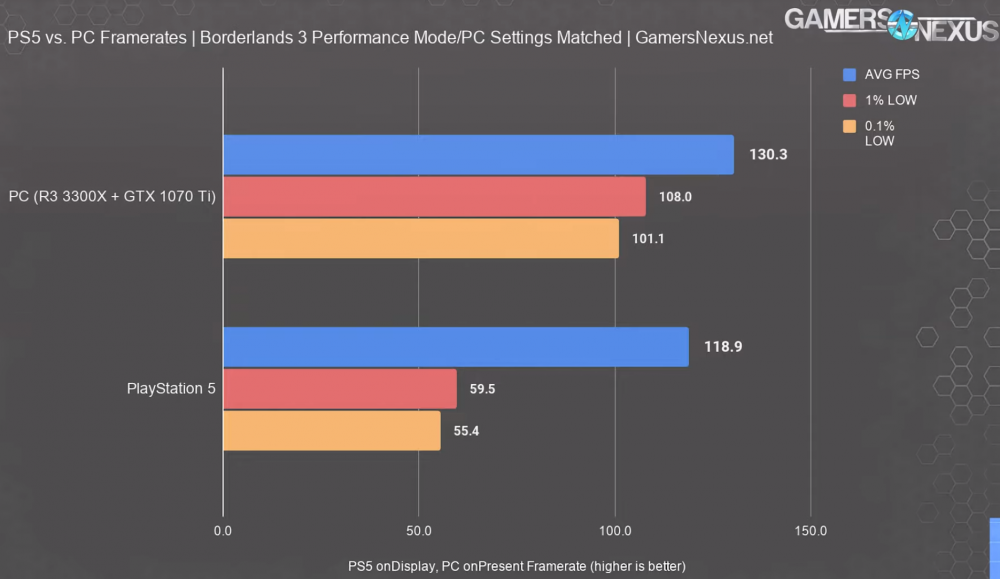
In order to match the PS5’s hardware for the benchmarks, Gamers Nexus had to elect a CPU and GPU/graphics card to as closely as possible match the PS5’s performance. For all games the CPU was AMD’s R3 3300X which is a 4 core 8 thread processor with a base clock of 3.8GHz and a boost clock of 4.3GHz and was released May 2020 and represented the lowest end of AMD’s Ryzen 3000 series processors that did not contain an integrated GPU.
For Devil May Cry 5, the GPU was Nvidia’s GTX 1060 6GB which came out mid-2016 and was a medium tier gaming product at that time.
For DiRT 5 the GPU was Nvidia’s GTX 1080 8GB, which released in May 2016 and was a high-end model for that time.
For the Borderlands 3 benchmark the PC’s graphics card was swapped out to the Nvidia GTX 1070 Ti 8GB, which released late 2017 and represented the middle-to-high end of that generation of GPUs.
Ray tracing was turned off in all of the testing on both PC & PS5.
Steve made sure throughout the video to make it abundantly clear that they could have selected lower performing/older hardware than the above, but to try and keep things simple they aimed for recent hardware that closely matched the PS5’s performance.
To emphasise, the hardware Steve from GN has selected is fairly low end compared to what we consider for gaming PCs in our business today. And when discussing the GTX 1060 6GB, the GTX 1080, or the GTX 1070 Ti in particular, they’re no longer in circulation due to being 2 generations old.
It should be becoming clear that the PS5 then isn’t exactly pushing the boundaries of technological advances since the PS4, but instead is playing a game of catch up. Even this isn’t new(s) for consoles!
Devil May Cry 5
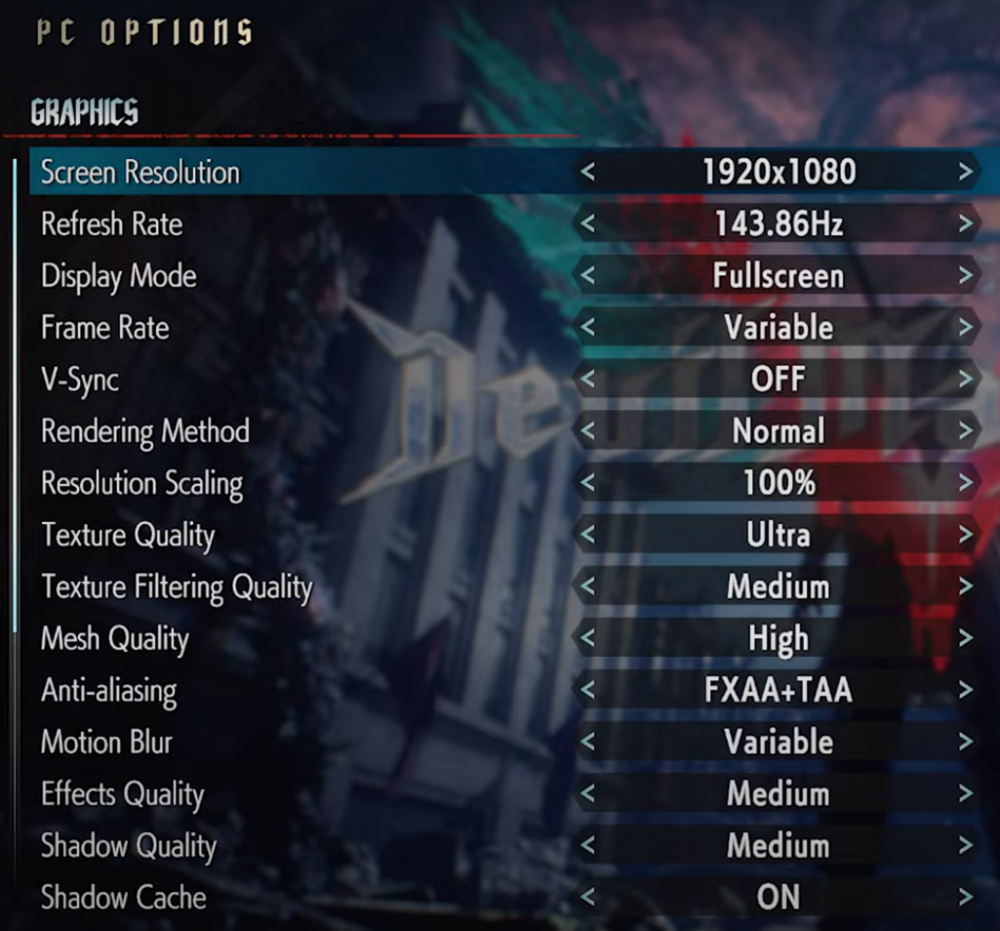
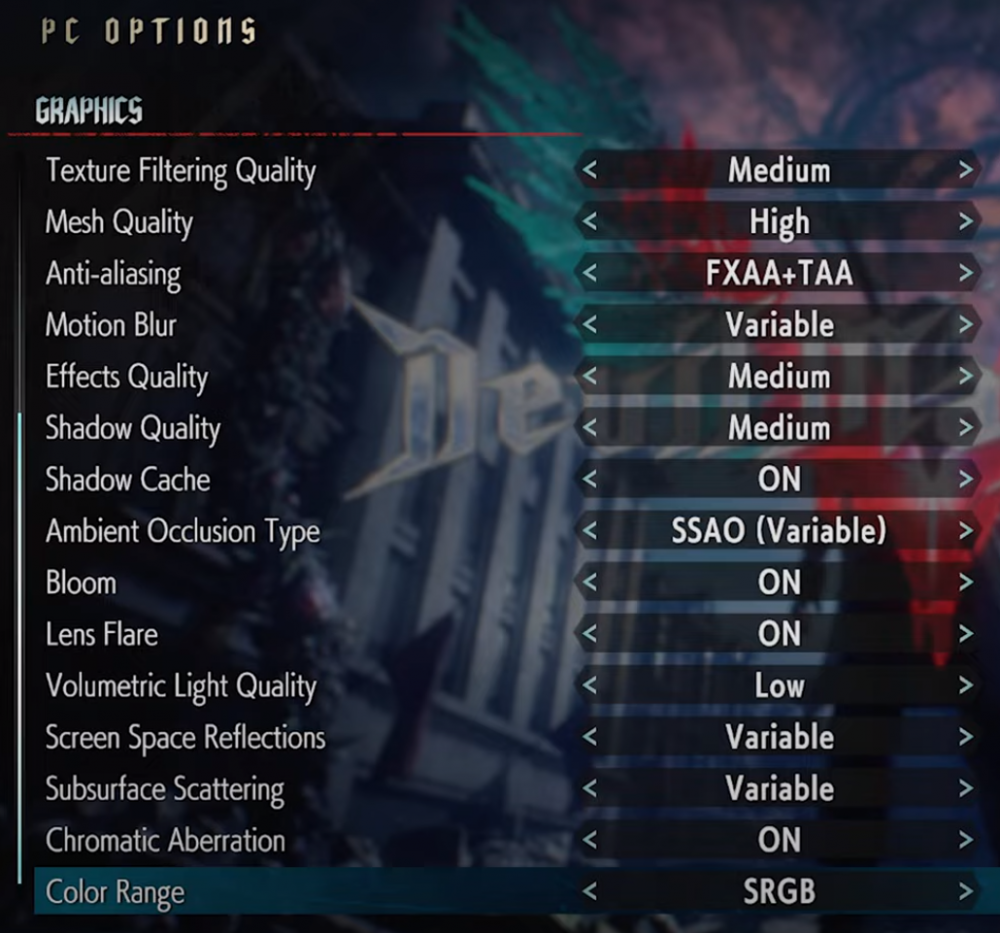
To match the PS5 as best as possible on the PC GN made up for this test, the following settings are in place:
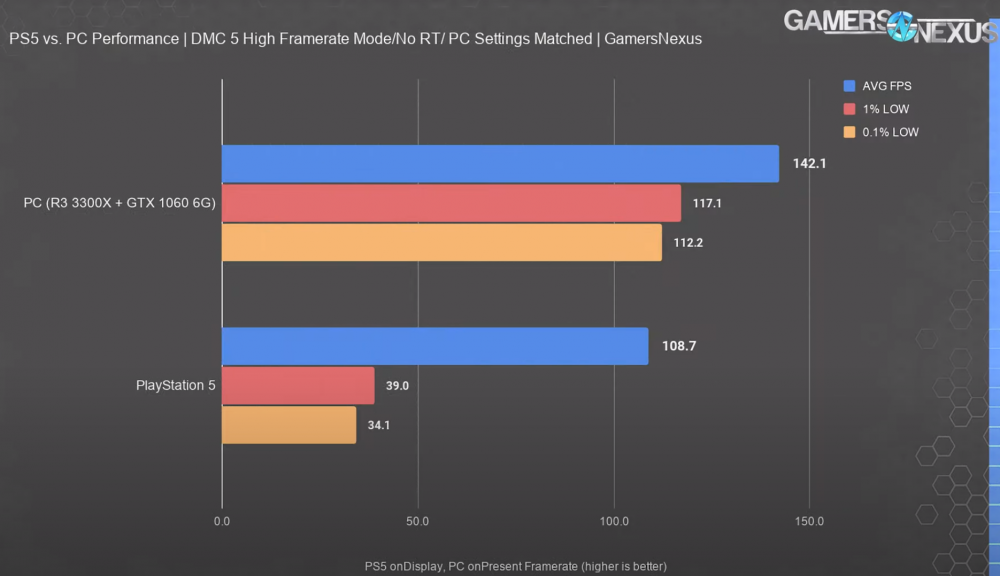
We can see the following FPS results from the benchmark they ran.
Apart from the higher frame rates from the PC, the discrepancy between the average and the lows are much smaller on PC than on PS5. This is also good news for the PC.
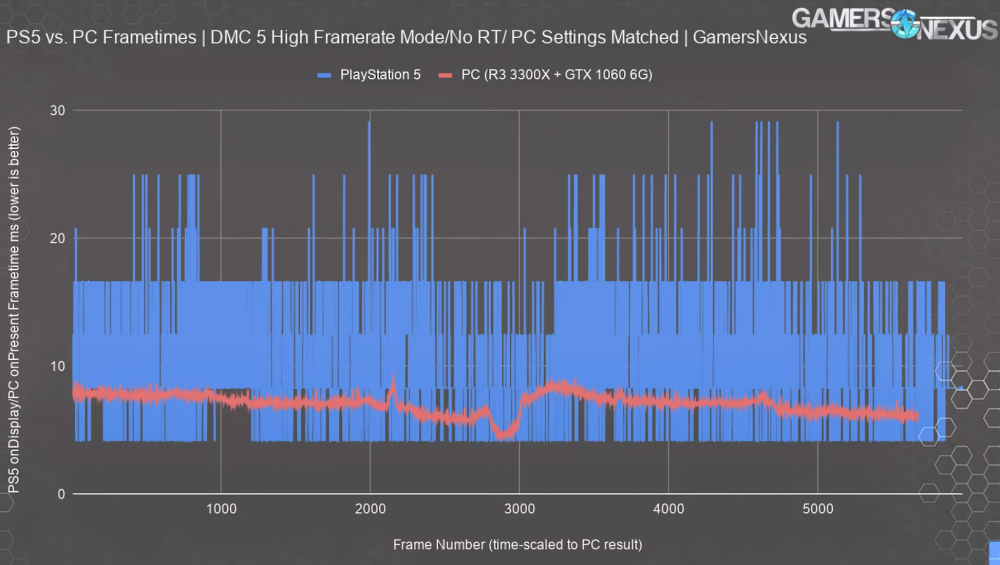
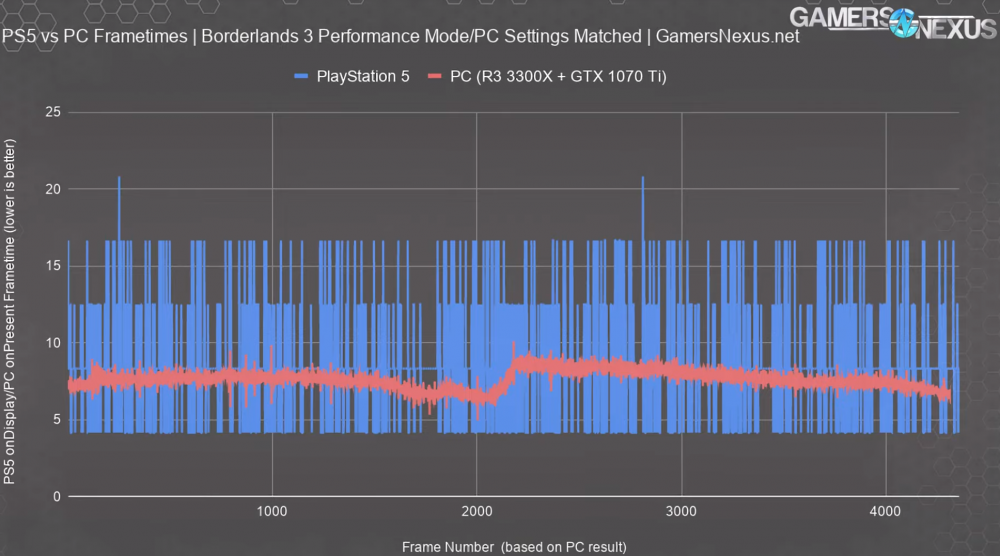
Something not as commonly spoken about is the frametime. In fairly simple terms, frametime tells you how long each frame takes to render. As for why this metric matters, to give an extreme example: say your GPU takes 0.9 seconds to render a single frame, then it quickly goes on to render 59 frames in 0.1 seconds. You’d perceive a very bad stutter, yet the FPS reading would still be able to stay at 60FPS. With frametime, essentially, what you want to see is consistency, and lower numbers. So here’s what GN found.
DiRT 5
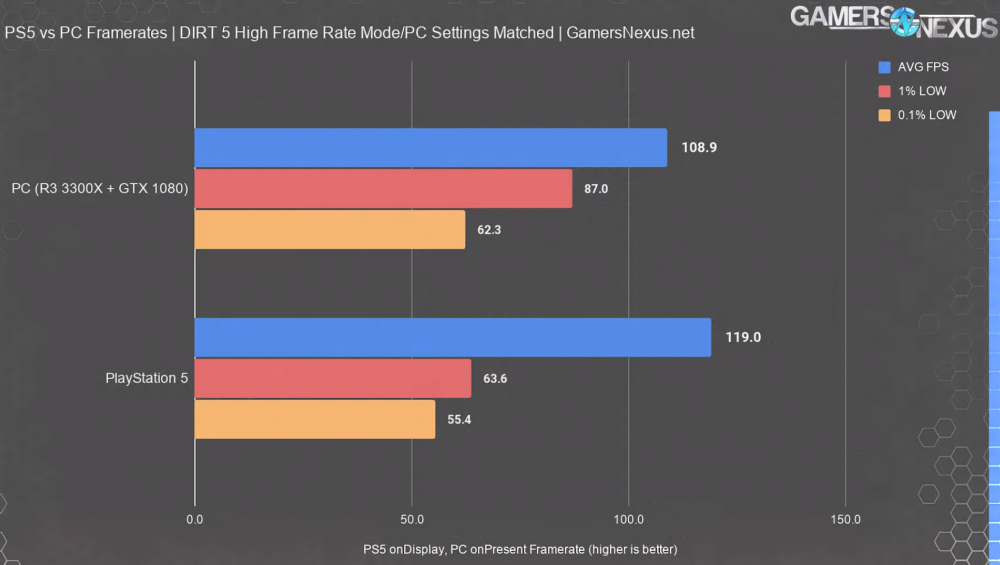
Although the benchmark will show the PC performed less favourably in terms of raw FPS, GN did comment that despite the settings on PC, the cars appeared shinier on PC, and more defined reflections of individual light sources, as well as the PS5 in 120FPS never having any spectators. It goes without saying that none of this is a precise direct comparison, but certainly this amplifies that.
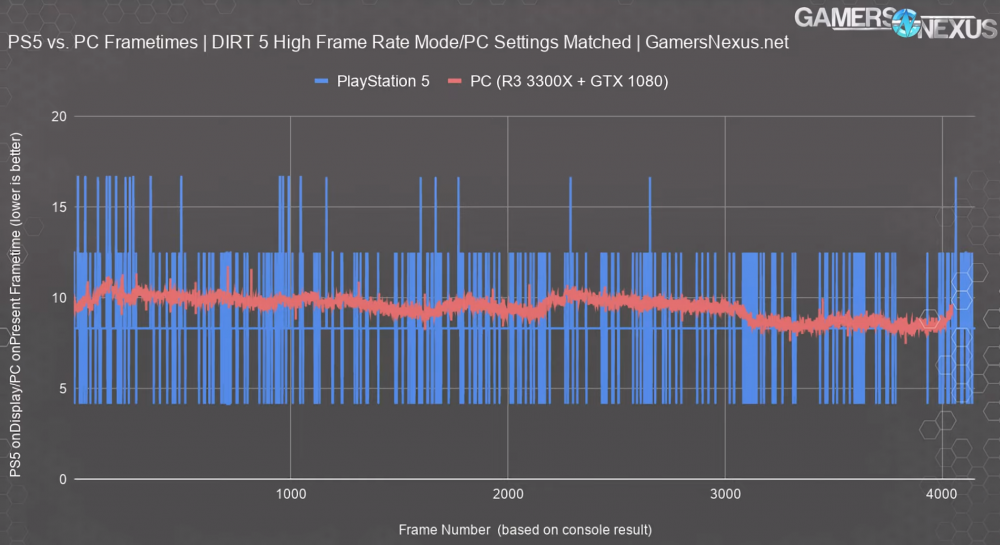
The frametime is once again more consistent on PC.
Borderlands 3
Conclusion
Steve expresses his dislike for “performance per dollar” type of comparisons, especially when comparing quite unlike products such as a gaming console to a gaming PC, as a PC can also serve other purposes, such as work related, whereas a gaming console is much more straightforward in that it basically only has one purpose.
It’s clear that the PS5 is quite good in these limited tests, but keep in mind that all this testing was done at a 1080p resolution, meaning we’re not exploring the 4K aspect of things and are instead focussed on the 1080p (which pretty much every display in your life these days should be at minimum) at high frame rate (which may not be in every display) up to 120 FPS.
Steve, in his conclusion, states that the PS5 is roughly where PC hardware/performance was about 5 years ago.
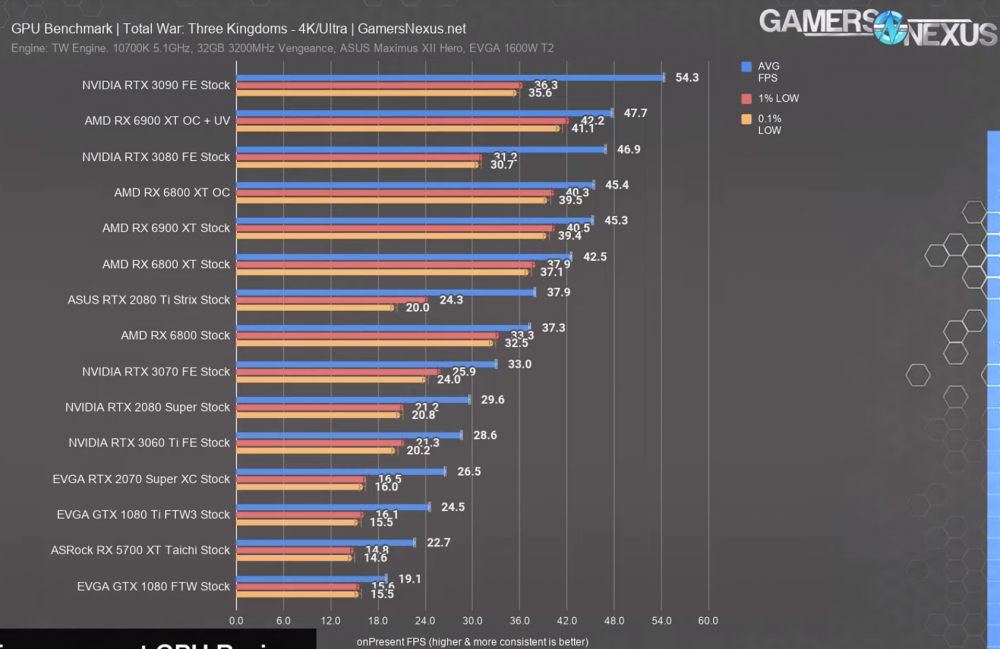
To give you an idea of how a GTX 1080 (which was the highest performing GPU Steve from Gamers Nexus used in these tests) performs verses currently available graphics cards, you can see the chart below.
At the time of writing, the next best performing GPU is the RTX 3060 Ti
Likewise, for the CPU we can offer the same type of information.
At the time of writing, the next best performing CPU is the AMD R5 3600
Assuming you were after the most cost effective PC from us that hit those targets, this would be that PC. Remembering that consoles generally sell at a loss, and the manufacturers usually rely on their customers purchasing games and subscriptions over the lifespan of the console to recoup their costs, as well as claim market share. Also of course that a gaming PC is also a PC, and can be upgraded over time to improve performance/features. Also, the PC linked above is considerably better performing than the benchmarks shown earlier on in this post!
To sum up, the PS5 should be fine for a casual gaming experience as it is quite cost effective compared to buying brand new PCs which also have a warranty. However, if you’re interested in doing more than just playing games, such as streaming or doing work, or playing games at truly impressive graphics quality + high frame rate & maybe even ray tracing, then the PC is still champion.
If you’re in the market for a gaming PC, checkout what we have on offer!
Although 2020 is a year most want to leave in their rearview mirrors, there’s still some lovely graphs for us to summarise 2020 in PC hardware as selected by you all: the customers.
The following graphs represent all the PCs ordered by customers during the 2020 period. Compared to 2019, 2020 had a 40% increase on the number of PCs processed.
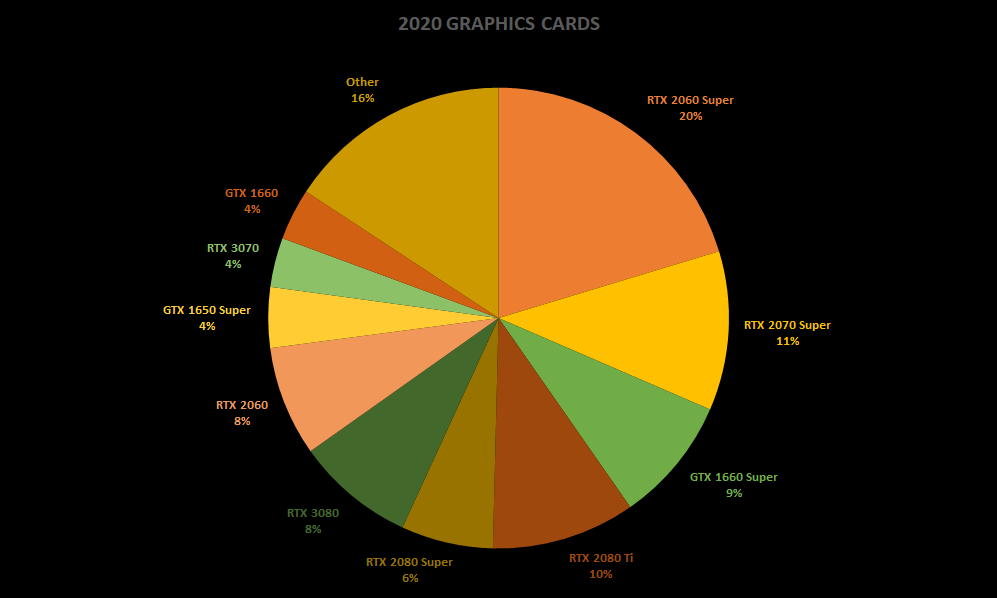
2020’s most popular graphics cards
A reminder that each GPU’s data is a combined total of OC, special order, liquid cooled, etc. editions to give a more complete representation of each GPU strain.
This time it’s worth reminding you that the RTX 30 series GPUs only launched September onwards. We also sold a significant amount of RTX 30 series GPUs as individual units which this post does not aim to count.
Once again this year, no AMD graphics cards represented. In fact, upon double checking, it seems that we didn’t sell a single AMD GPU this year in a PC (thanks, shortages). Can we change this trend next year?
There was quite a few Quadro cards, but they were quite spread so they didn’t make it to the top 10.
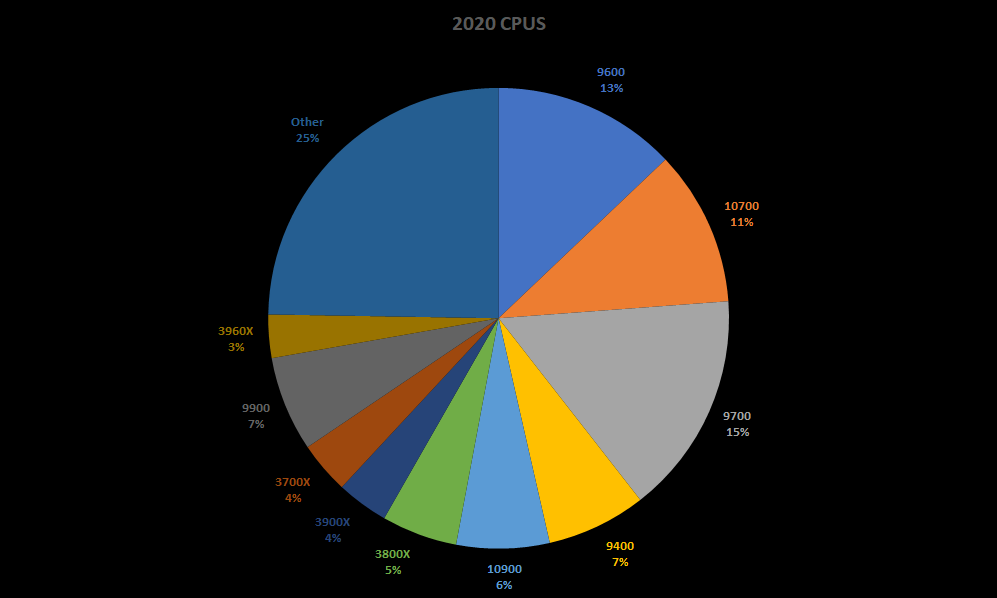
2020’s most popular CPUs
CPU variants are combined. Example: 10900F, 10900, 10900KF, 10900K are all represented under the 10900 umbrella.
2020 brings the i7 a win, albeit from the 9th gen with the 9700. Remember that Intel’s 10th gen only hit during this year, with stock shortages for some time, so the 9th gen overstayed its welcome a little bit, but is now well and truly out the door. For the best, because Intel has their eyes set on their 11th gen CPUs for early 2021!
Sadly due to AMD’s 5000 series launching quite late this year, and their low stock availability, there wasn’t enough numbers to have one take out one of the top 10 positions. Perhaps next year!
2020’s most popular cases
Combined case variants for each chassis. Eg: Corsair 100R & 100R Silent shown as simply 100R, same goes for white/black variants.
Last year was quite dominated by Corsair, and this year isn’t too different, but we are seeing a rise of MSI cases. MSI does offer some nice features at a reasonably price point, so it’s nice to see our customers are willing to stray a little from the trusty Corsair brand to get something a little more ‘unique’.
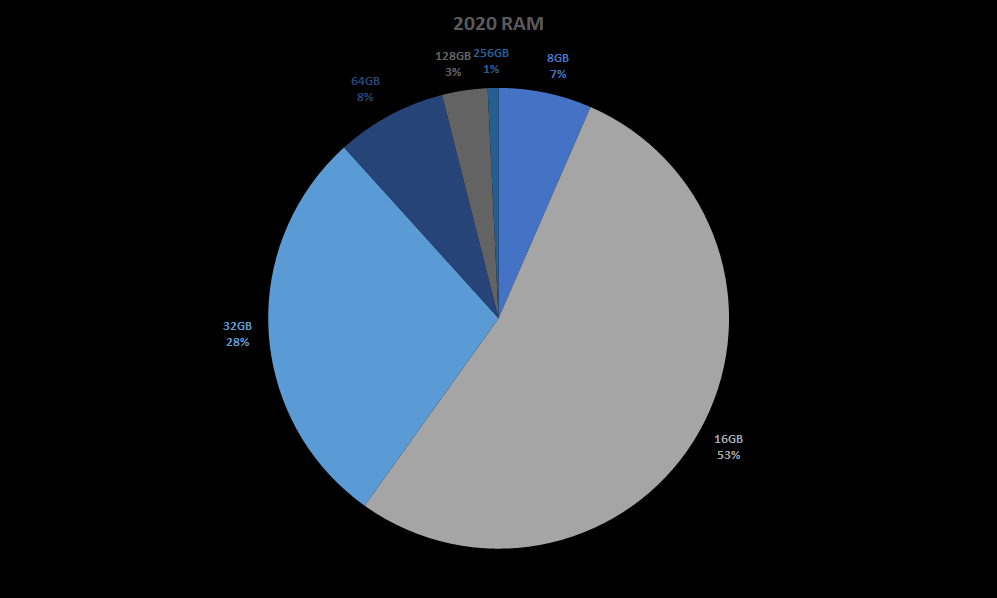
2020’s most popular RAM configurations
A new-comer category, thanks to a new way we aggregate data. Unlike other categories, we’re able to show every option available to customers due to the limited RAM configurations on offer: 8GB, 16GB, 32GB, 64GB, 128GB, and 256GB.
As with the other items, 16GB Core, 16GB OC, 16GB RGB OC will all be combined to just 16GB – this applies to all RAM configurations.
We are turning away from 8GB PCs as much as possible, so the only people ordering 8GB are manually opting for this through the power of our custom PC builder. Fine for those wanting a basic gaming/home/office PC, but most power-users or serious gamers/home/office customers should really look to having 16GB at minimum. 32GB isn’t quite getting our recommendation unless you’re looking to play MSFS2020 or similar, but perhaps that recommendation is getting closer to being a standard.
256GB is obviously not something our everyday customers are going for, fairly certain it’s just the highest of high end customers with serious workstations/servers who need that. Truly for the 1%…
2019’s average PC price tag was $3,300 which was an increase of just $100 compared to 2018. This year, we’re up to $4,000, which is an increase of about $700. This can likely be explained by the RTX 30 series, and, well… just about anything else that this year consisted of (global shortages, global logistics issues, temporary shutdowns, etc).
2019’s most expensive PC as previously reported was $13,000, which was at the time the second most expensive PC we’d built for a customer ($14,000 in 2017). This year we’ve smashed all records. Most expensive PC sold this year was $22,500 (yes; that’s a single PC, no; we’re not including a monitor or any other items). We’re very happy with this, but also quite sad that we probably won’t be able to beat this record very easily. Time will tell!
2020 was a very demanding year. We think we’ve done our best, and our customers thank us for this. Thank you, too.
Onto 2021
We’ll be out of the office after our last day on the 24th of December (Christmas Eve) where we try to put PCs in the hands of as many of our remaining customers as possible. But, we will of course be back next year, 4th of January. Any orders place between now and then will be processed when we’re back in the office.
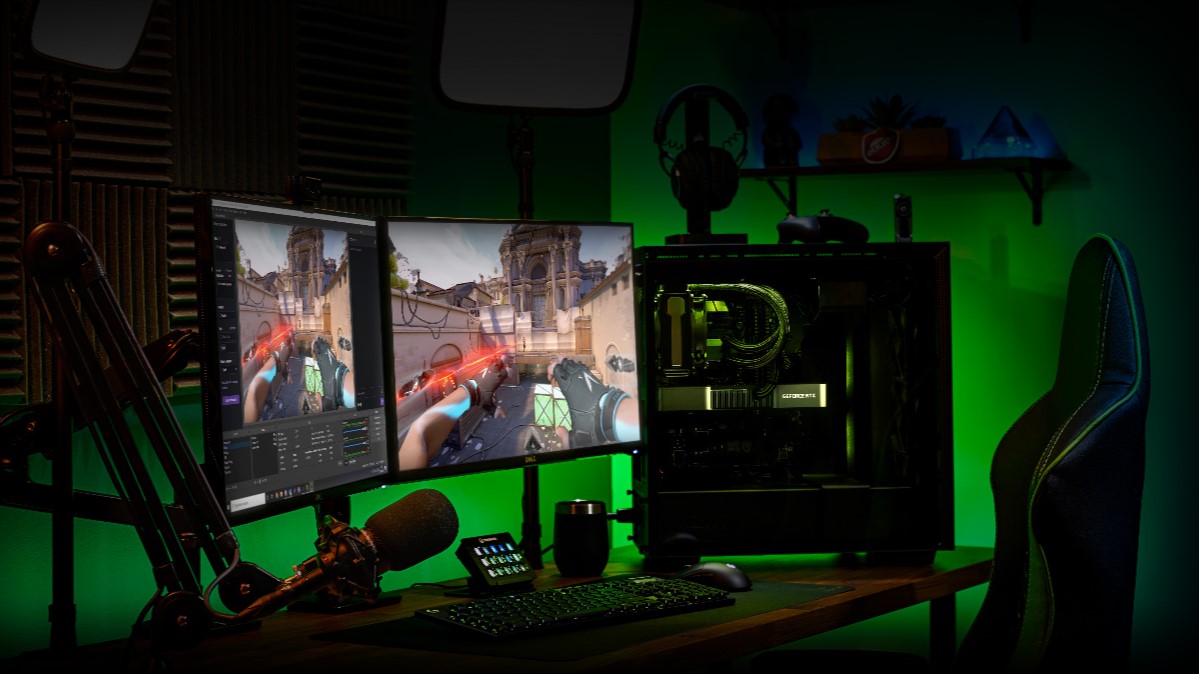
In what can be seen as an expansion on some of NVIDIA’s pre-existing developments, such as ShadowPlay, Broadcast is set to be the next hit for NVIDIA-powered gaming PCs to enable gamers to present themselves as more highly polished streamers without the high setup costs.
The world of live streaming has expanded rapidly this year: Twitch has seen an 89% increase in the number of streamers, while viewership is up 56%. And mainstream celebrities from all walks of life are getting in on the action, too, from Terry Crews to Post Malone, to Logic.
With the GeForce RTX 20 Series, NVIDIA introduced an updated Encoder (NVENC) that delivers best-in-class video quality, while offloading work from the CPU to boost framerates in games. NVIDIA worked closely with top streaming apps such as OBS, Discord, Streamlabs, Twitch Studio, and XSplit to improve broadcast performance.
While these efforts have improved video encoding quality, this is only one piece of delivering a high quality broadcast — audio quality, camera and room setup are also key to viewers’ enjoyment. Yet, not everyone has the luxury of a dedicated home studio, or can afford expensive cameras, microphones and greenscreens to improve their production quality.
With the launch of GeForce RTX 30 Series GPUs, NVIDIA’s helping live streamers up their game even further with the new NVIDIA Broadcast app. It upgrades any room into a home broadcast studio by transforming standard webcams and microphones into smart devices through the power of AI.
The Broadcast app offers three AI-powered features:
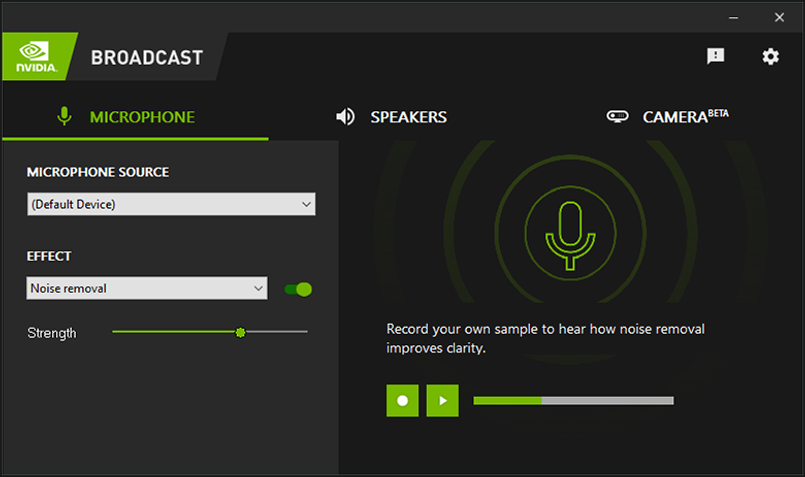
Noise Removal: remove background noise from your microphone feed – be it a dog barking or the doorbell ringing. The AI network can even be used on incoming audio feeds to mute that one keyboard-mashing friend who won’t turn on push-to-talk.
Virtual Background: remove the background of your webcam feed and replace it with game footage, a replacement image, or even a subtle blur.
Auto Frame: zooms in on you and uses AI to track your head movements, keeping you at the center of the action even as you shift from side to side. It’s like having your own cameraperson.
These features can be used beyond game broadcasting as well — from video conferencing at home with Zoom, to gaming with friends on Discord.
NVIDIA Broadcast is a universal plugin that works with most popular live streaming, voice chat and video conferencing apps. It’s supported on any NVIDIA GeForce RTX, TITAN RTX, or Quadro RTX GPU, using their dedicated Tensor Core AI processors to help the app’s AI networks run in real-time, right alongside your games.
NVIDIA Broadcast has been built for and with the community. NVIDIA received a ton of great feedback on Noise Removal from an early community beta of the feature codenamed RTX Voice. Thanks to the feedback, plus Tensor Core and software optimizations, NVIDIA has materially reduced the performance cost of the AI network while tripling the number of noise profiles supported.
For the new Virtual Background and Auto Frame camera features, NVIDIA is releasing them as beta so the community can test drive and provide feedback to help improve performance and quality.
For those of you that want to try out the AI noise removal capabilities but aren’t ready to upgrade to an RTX GPU yet, NVIDIA have also patched RTX Voice with support for NVIDIA GeForce GTX GPUs. Though, of course, your mileage may vary on older cards.
NVIDIA’s new GeForce RTX 30 Series GPUs combine the industry’s best hardware encoder with NVIDIA Broadcast AI-accelerated voice and video effects to help you stream like a pro. Check back later this month to download the NVIDIA Broadcast app.
We think this will be huge for the hundreds of our customers who’ve told us this year that they’re going to be dipping their toes into the world of streaming.
Evatech will of course be offering all of the NVIDIA RTX 30 series cards once they’re released to the world with the RTX 3080 launching just next week (17th of September 2020) and the RTX 3090 following a week later (24th of September 2020). NVIDIA’s RTX 3070 and RTX 3060 are expected in the weeks/months following, so stay tuned for those too. You’ll be able to find the branded models via our Graphics Cards category, or in our customisable systems via our leading gaming PC platforms of the Intel 10th gen-powered Valkyrie X, and the AMD Ryzen 3000 series-powered Wraith.
Another year just about wrapped up for us. With the year ending, it’s common to look back at what made this year as great as it was. And what better way to do that than with some data and graphs!
While we sometimes think we know what the most popular choices would be since we build all the PCs right here ourselves, it’s easy to forget or be swayed by what’s been selling recently. The following graphs are true for all PCs sold by Evatech to Evatech customers.
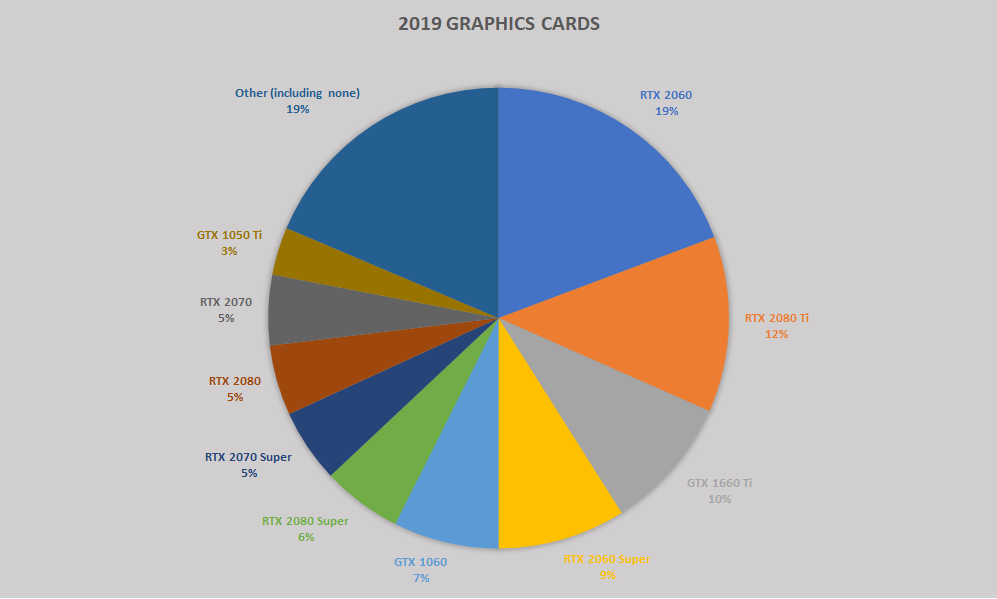
2019’s most popular graphics cards
A note that each GPU’s data is a combined total of OC editions, special order editions, liquid cooled variants, etc. to give a more full representation of each GPU.
Also worth keeping in mind that the Super cards only launched late July.
Since there are no AMD graphics cards here – it’s pretty clear Nvidia is dominating the gaming scene right now. But what will 2020 have in store?
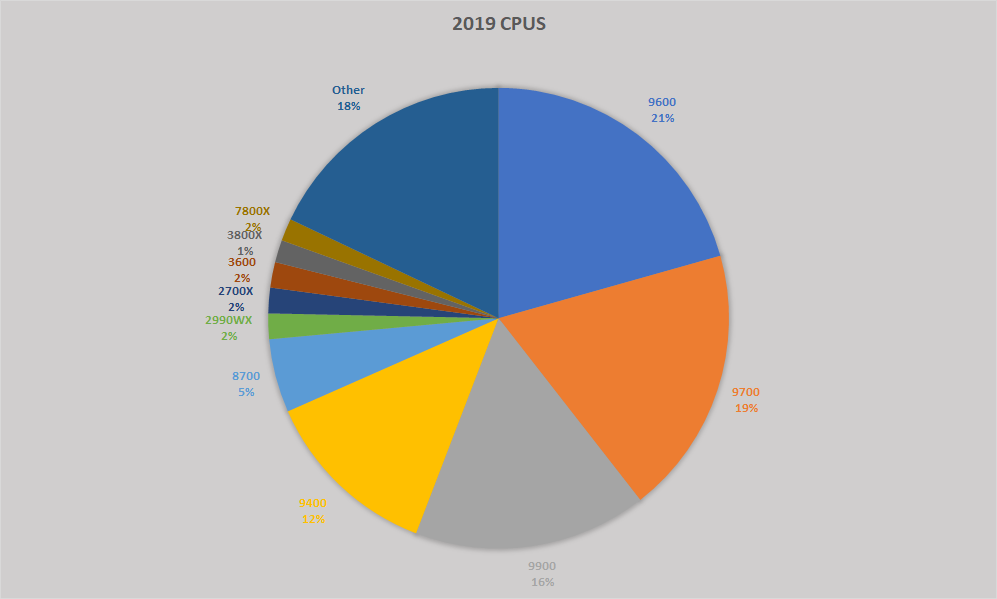
2019’s most popular CPUs
Similar to GPUs, all CPU variants are combined to show each CPU’s data. eg: 9900, 9900KF, 9990K, and 9900KS are all under the “9900” umbrella.
i5 takes out the win for 2019 with i7 not far behind, and i9 (for those with larger budgets) in third place. We have some representation from AMD in the form of Threadripper (workstation/server use) as well as their consumer grade 2nd & 3rd gen Ryzen chips.
2019’s most popular cases
Again, combined case variants to represent each chassis to the fullest.
Unsurprisingly for all Evatech staff, the Corsair 270R chassis takes the crown. A massively popular case accounting for over 20% of all our builds for the year! A huge amount of cases we sell are Corsair, as you can quite easily make out from the graph. With the large amount of case options we offer, the spread is pretty large over a number of cases.
Worth noting here that the Deepcool Earlkase gets such a large slice of the pie thanks to being the case for our RTG Black/White systems.
This is why customisable PCs is so important
While we’d love to give each and every one of you an i7 or i9 with an RTX 2080 Ti (since that offers the best gaming experience right now) – we can plainly see that’s not how this works. Everyone has different budgets, different tastes, and unique needs & wants.
Our average PC price tag this year was $3,300, up just $100 on last year’s average. The most expensive single PC this year coming in at just over $13,000, up on 2018’s $11,500 but still not beating 2017’s $14,000 PC.
We’d hate to be one of those stores that just sells pre-built PCs with very little options to customise. We’re truly custom. Check it out while we’re on break, and place an order for when we’re back in the office (January 2nd) replying to emails, taking phone calls, and processing orders: putting smiles on thousands more customers in 2020.